How to Write a Good Prompt: A Practical No BS Guide
A concise and detailed guide to writing highly effective prompts, incorporating core engineering principles and practical field experience.
Table of Contents
Introduction
Prompt engineering is an iterative, empirical science. It's not about magic keywords; it's about finding the precise balance between simplicity, specificity, and logic to steer a model's latent space toward your desired outcome.
Whether you are automating a complex DevOps pipeline, architecting agentic workflows, or simply generating creative content, this guide distills core engineering principles and field-tested experience into a "No BS" framework for better prompting.
Stop Using "Please" and "Thank You"
It sounds counter-intuitive—especially if you were raised to be polite—but you should stop using "Please" and "Thank You" in your prompts.
LLMs aren't humans; they are probabilistic algorithms that predict the next token based on statistical patterns. Adding polite fillers:
- Consumes Tokens: Every "please" is a token you pay for (either in money or context window).
- Dilutes Intent: Extra words can introduce noise, potentially nudging the model away from the core instruction.
- Adds Zero Value: Sam Altman himself has noted that being polite doesn't improve performance.
Be direct. Be precise. Save your politeness for your coworkers.
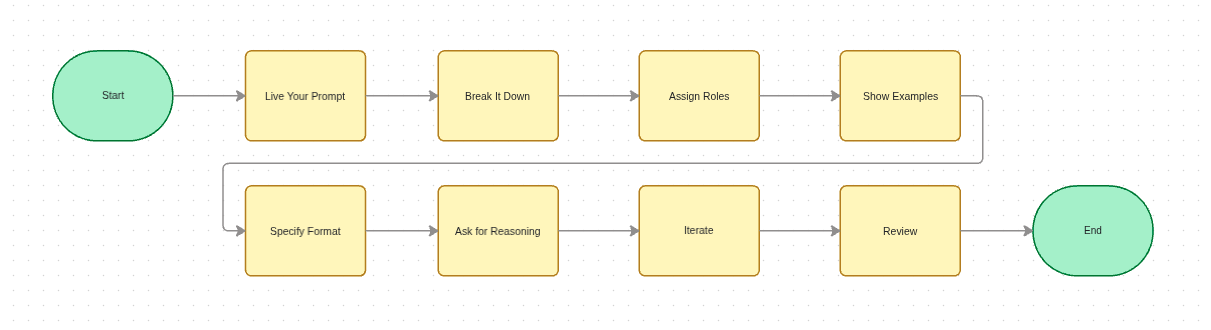
"Live" Your Prompt
The most foundational rule is to approach the model as if you were performing the task yourself—provide every bit of context and detail you would need to get the job done. This mirrors robust engineering workflows: we visualize high-level quarter goals, decompose them into manageable sub-tasks, and execute systematically.
Be Specific and Descriptive
Detail is your best friend. Vague prompts lead to vague outcomes. If you leave a decision up to the model, you are essentially gambling that its statistical "average" matches your specific need.
Don't "spoon-feed" the model every character, but do provide enough context so it doesn't have to guess. Imagine the constraints and potential edge cases beforehand, then prompt with the context required to navigate them.
Before (Imprecise):
"Write some code to fix the authentication bug."
After (Specific):
"Identify and patch the null pointer exception
when a user session expires during the OAuth
callback in `auth_service.py`."
Direct Tool Usage
When building agents, remember that toolsets are often limited. If you’ve thought through the task manually, you already know which tools are necessary. Direct the AI agent to use them exactly as you would. For instance, if you need to check a directory of .proto files for a specific attribute, explicitly tell it where to look. This simple instruction eliminates trial-and-error tool calls, saving both latency and cost.
Future-Proofing (Building Skills)
Approaching your prompts with this level of rigor allows you to eventually convert them into repeatable "skills" for autonomous agents. Reusing the same manual prompt over and over is a waste of resources—a mistake I made frequently when I first started. Invest the time to get the "Skill" right the first time so your agents can scale your efforts later.
Break Your Task into Multiple Prompts
Even the most advanced models have a "contextual ceiling." Dumping a massive, multi-staged requirement into a single prompt often leads to hallucinations or skipped steps—a lesson I learned the hard way while building complex automation agents.
The fix is straightforward: Divide and Conquer. Break large, complex tasks into simpler subtasks and build up gradually. Each prompt should have a single, clear objective. Once one step is verified, feed its output as context into the next.
You can further improve an LLM's performance on complex logic by encouraging "Chain-of-Thought" reasoning. Simply prompting the model to "think step by step" helps it decompose hard problems into manageable pieces instead of jumping to an (often wrong) conclusion.
Before (Giant Task):
"Build a complete React application that fetches
live weather data, uses secure user authentication
with JWTs, and is styled with Tailwind in dark mode."
After (Divided & Sequential):
Prompt 1: Scaffold a basic React application using Vite
and configure Tailwind CSS with a dark mode toggle.

Prompt 2: Now that Tailwind is working, let's build
the login page UI layout component.
Assign Roles and Clear Instructions
Assigning a persona to an LLM isn't just a gimmick—it genuinely changes the quality of the output. During training, the model learned distinct language patterns, reasoning styles, and domain vocabulary associated with different professional roles. When you say "Act as a senior backend engineer," you're anchoring the model's token predictions to the distribution of text written by senior backend engineers in its training data.
Specify the Audience
Constraining the target audience is the fastest way to control tone and complexity without writing long paragraphs of style instructions.
- Learning a new field? Ask the model to explain it like you're a high school student to grasp the fundamentals.
- Deep-diving into internals? Ask for an explanation aimed at a research student. This allows the model to skip the basics and "get to the point," saving you time and context window.
You can even combine roles: "Act as a NASA physicist and a LinkedIn influencer" to find that sweet spot between technical accuracy and high engagement.
Be Assertive: Focus on What To Do
Avoid telling the model what not to do. Instead, be explicit about what it should do. Negative instructions ("don't be verbose") give the model a vague constraint; positive instructions ("respond in under 100 words") give it a concrete target. Start every prompt with clear action verbs—"Write", "Classify", "Summarize", "Translate"—to immediately anchor the model's intent.
Before (Vague):
"Tell me about black holes, but don't make it too complicated."
After (Role & Audience):
"Act as a theoretical physicist from NASA.
Write a short, engaging 3-paragraph summary
explaining how black holes form.

The target audience is high school science students,
so keep the tone educational and accessible."
After (Multi-roles & Audience):
"Act as a theoretical physicist from NASA
and a LinkedIn influencer who explains complex
topics in a simple, engaging manner.
Write a short, engaging 3-paragraph summary
explaining how black holes form.

The target audience is high school science students,
so keep the tone educational and accessible."
Show, Don't Just Tell (Use Examples)
If you have a specific desired outcome or formatting requirement, providing examples within the prompt is one of the most effective strategies you can use.
Few-Shot Prompting
Giving the model a few high-quality demonstrations (examples of inputs and their ideal outputs) helps it understand your specific criteria and intent much faster than instructions alone.
Before (Zero-Shot):
"Extract the names and ages and output as JSON."
After (Few-Shot):
"Extract names and ages from the text in JSON format.

Text: 'John is 35 and works as a plumber. Sarah, 28, is a teacher.'
Output: `[{"name": "John", "age": 35}, {"name": "Sarah", "age": 28}]`

Text: 'At 19, Mike is the youngest player.'
Output:"
You can also try using TOON (Token Oriented Object Notation) for structured data extraction. It saves tokens and is more efficient than JSON for LLMs.
Specify Output Format
While few-shot examples show the model what you want, sometimes you just need to declare it explicitly. Don't leave the structure of the response to chance — if you need the output to be parsed by another system or displayed in a specific UI, state the exact format, keys, and constraints upfront.
Example:
"Analyze the following logs and return the result
as a JSON object with the keys: 'error_count',
'critical_paths', and 'suggested_fix'."
Ask for Reasoning
This is different from the "think step by step" technique discussed earlier. Chain-of-Thought helps the model solve a problem; asking for explicit reasoning helps you audit its work. By requesting the model to wrap its thought process under a dedicated "Reasoning" section, you gain two major advantages:
- Bug Identification: You can pinpoint exactly where the model's logic diverged from your intent, instead of staring at a wrong answer with no visibility into why.
- Reverse Learning: You learn how the model interprets your prompts, which directly helps you write better ones in the future.
Before (No reasoning requested):
"I am building a real-time analytics dashboard
that ingests 50K events/second.
Recommend a database."
After (Explicit reasoning):
"I am building a real-time analytics dashboard
that ingests 50K events/second.
Recommend a database.

Before giving your final answer, write a
'Reasoning' section where you evaluate at
least 3 options with trade-offs for write
throughput, query latency, and operational
complexity."
Iterate, Don't Restart
Real prompt engineering is rarely a single shot—it's a conversation. When you get an 80% correct response, don't throw it away and rewrite from scratch. Instead, follow up with a targeted refinement prompt that references the previous output.
"Good structure, but the second paragraph assumes
the reader already knows what JWTs are.
Rewrite only paragraph 2, adding a one-sentence
explanation of JSON Web Tokens before using the term."
This iterative approach preserves the good parts while surgically fixing the weak ones—and it teaches you which parts of your original prompt were under-specified.
Choose Your LLM Wisely
Not all Large Language Models are created equal. The best prompt in the world will underperform if aimed at the wrong model. The principle is simple: match the model's strengths to your task category. Here is a rough guide based on my experience as of early 2026—but keep in mind this landscape shifts fast:
| Model | Strength (as of early 2026) |
|---|---|
| Claude | Deep reasoning and large-scale code generation. My go-to for complex programming tasks. |
| Gemini | Multimodal understanding (images, video), daily general-purpose tasks, and long-context workloads. |
| Grok | Social media copywriting and conversational drafts. |
| ChatGPT | Broad general knowledge. Strong ecosystem of plugins and integrations. |
Disclaimer: Model capabilities evolve rapidly. Test your specific use case across providers periodically—what's true today may not hold in six months.
Always Review the Output
No matter how sophisticated the AI agent or LLM gets, never blindly trust its output. Hallucinations, syntax errors, and subtle misinterpretations of instructions happen frequently.
A real example: I once asked an agent to refactor a Python service and it produced clean, well-structured code — but silently swapped a >= comparison to > in a boundary check. The tests passed because the edge case wasn't covered. That single-character difference would have caused a production bug. I only caught it because I diffed the output line-by-line.
Treat the AI as an incredibly fast but junior engineer. It generates the bulk of the work instantaneously, but it is ultimately your responsibility to review, run tests against, and verify the final code or content before approving it.
Conclusion
The key to prompt engineering is consistency and curiosity. It is not a "one and done" task; it is a cycle of refinement. By being specific, leveraging role-play, and breaking down complex logic, you shift from "chatting with a bot" to "programming a system."
My final piece of advice is simple: Stay experimental. AI is a rapidly evolving field where last month's "best practice" might be this month's legacy technique. Keep reading research papers, follow the technical newsletters on SubStack, and above all—keep prompting.
References
Here are some of the resources that helped me write this blog post:
- Prompt Engineering By Lilian Weng
- Prompt Engineering Guide by Prompting Guide
- Prompt Engineering Guide by Learn Prompting
...and lastly, a lot of trial and error.
Happy prompting!

Written by
Abhishek Singh Kushwaha